Please send us any scam/phishing emails you have received by reporting them here
For access to our huge blacklist of domain names and to sign up to our live feed of ALL the scams we receive please take a look at our Honeytrap service
If you have received the email below, please remember that it is very common for these email scams to be redistributed at a later date with only slightly different content, such as a different subject or return address, or with the fake webpage(s) hosted on a different webserver.
We aim to report every variant of the scams we receive, so even if it appears that a scam you receive has already been reported, please submit it to us anyway.
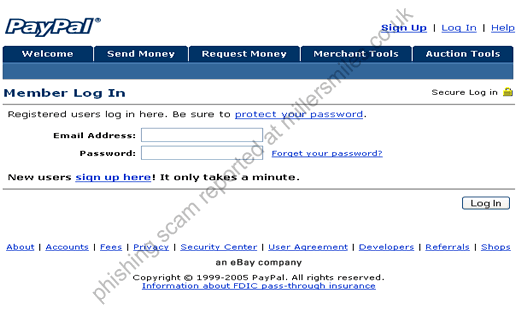
Email asks you to confirm/update/verify your account data at PayPal by visiting the given link. You will be taken to a spoof website where your details will be captured for the phishers.
PayPal never send their users emails requesting personal details in this way.
The REAL URL of the spoof website looks nothing like the actual PayPal URL.
Email:
"We are contacting you to
remind you that on 04 Sept 2005 our FRAUD ALERT Team
identified some unusual activity in your account coming from a
foreign IP address : capitol.rdsindia.in ."
Your account is FRS marked !
We are contacting you to
remind you that on 04 Sept 2005 our FRAUD ALERT Team
identified some unusual activity in your account coming from a
foreign IP address : capitol.rdsindia.in . In accordance
with PayPal's User Agreement and to ensure that your account has not
been compromised, access to your
account was FRS marked (
marked as FRAUDULENT Spammed account ) . Your account will remain
marked until this issue is resolved.
To secure your account and
quickly restore full benefits, we may require some
additional information from you for the following reason:
We have been notified that a card associated with your
account has been reported as
lost or stolen and involved in fraudulent transactions,
or that there were additional problems with your card.
To securely confirm your PayPal information please go
to your PayPal's Update Profile by clicking the link bellow and fill
in the required information :